Bupa Dental practices can pay for Mediref annually by purchase order through Coupa, without a credit card.
- Choose Standard or Plus. The person choosing the plan needs permission to manage billing for the practice.
- Selecting Pay through Coupa gives your practice 45 days of sending access while the purchase order is arranged.
- You still need to raise the purchase request in Coupa. Selecting the option in Mediref does not submit it to Bupa.
Choose your plan in Mediref
New to Mediref? Create an account and follow the steps to join or set up your practice. Choose the Coupa option when selecting your plan during setup. If your practice already uses Mediref, sign in and open Settings → Billing.
Choose Standard or Plus, then select Pay through Coupa. Mediref shows the details to copy into your purchase request and the date your temporary sending access ends.
Raise the purchase request in Coupa
- Open Bupa’s Coupa home page. Choose Not sure? Let us guide you, then Write a request.
- Enter the details for your chosen plan using the examples below. Search for Mediref as the supplier and select AM HEALTHCARE PTY LTD T/AS MEDIREF. Use a quantity of 1 and the GST-inclusive unit price shown in Mediref.
- Check that the request identifies the correct practice, including its delivery address and cost centre. Choose Add to Basket, then Submit for Approval.
Mediref has no catalogue item in Coupa, so enter the description yourself. You do not need a quote to raise the request.
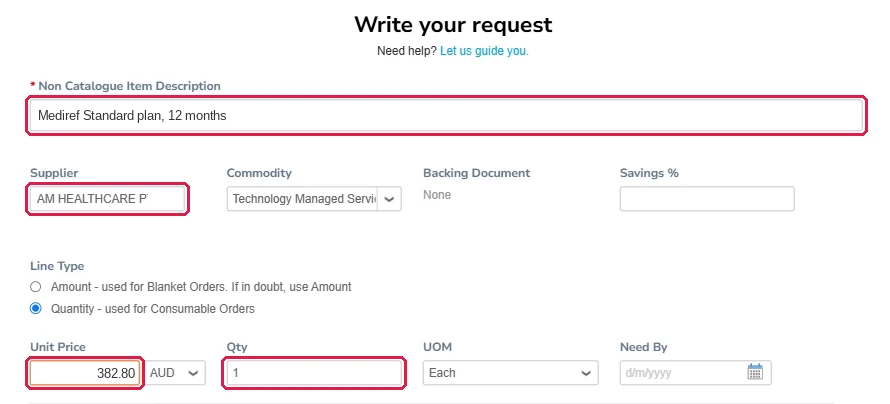
Standard
Enter Mediref Standard plan, 12 months as the description. The annual price is $348 excluding GST ($382.80 including GST). Enter 382.80 as the unit price.
Plus
Enter Mediref Plus plan, 12 months as the description. The annual price is $1,068 excluding GST ($1,174.80 including GST). Enter 1174.80 as the unit price.
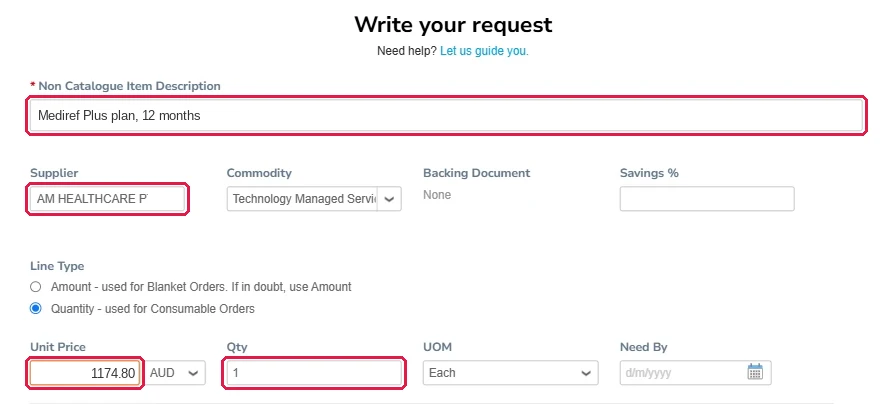
The examples show the form for each plan. If the price shown in Mediref changes, use the current details on Settings → Billing.
After Bupa approves
Coupa sends the purchase order to Mediref. We start your annual plan when we receive it and submit the invoice against that purchase order.
When Coupa emails Confirm receipt for Invoice, open the request and confirm receipt so Bupa can process payment. Purchase approval alone does not complete this step.
Billing is annual. A new purchase order is needed for the next year; we will contact your practice about renewal.